7/3/12

Game Downloader


Description

Game Downloader is a portable and open source download client, which interacts with a server side library for downloading numerous games. With the help of this utility, you can download more than 200 games, by simply selecting a game category then selecting any game from the available list. This makes it easy to obtain games, without having to manually search and download the game via a browser.

Features

  • Multiple game categories.
  • Over 200+ games to download.
  • Games are added or updated weekly.
  • Customizable user friendly features.
  • Small and Portable.
  • Installer for the PortableApps platform.
  • This is a free and open source project, I hope everyone enjoys using it. Any feedback or suggestions will be considered and responded to as quickly as possible.
Source:http://sourceforge.net/projects/dev-fire-gd/

Open Freely


Product Description:
Open Freely is a piece of software which will open over 100 different file types for Windows® machines. Not only will it allow you to view, edit and print your images and documents but you may also view videos and listen to audio files. All in one application! Stop downloading programs for each of these purposes and instead rely on Open Freely to make your computer using experience easier. We highly recommend you download this product.


DP Animation Maker


Easy to Use

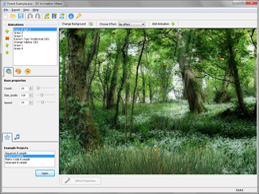
For creating a new animation you need only one picture. You can easily add atmospheric effects, animals, and other objects with a few mouse clicks.

GIF, AVI, and EXE Support

The program supports exporting animations into three popular formats with flexible parameter adjustment.
  • Animated GIF
  • Video format
  • Playing animation in a windowed application 

Wide Range of Tools

A rich toolset lets you create aquarium backgrounds, nature scenes, or abstract animations. It includes:
  • Weather effects
  • Light effects
  • Fish
  • Plants
Source:http://www.animationsoftware7.com/


Remove Empty Directories - a freeware tool to batch delete empty folders


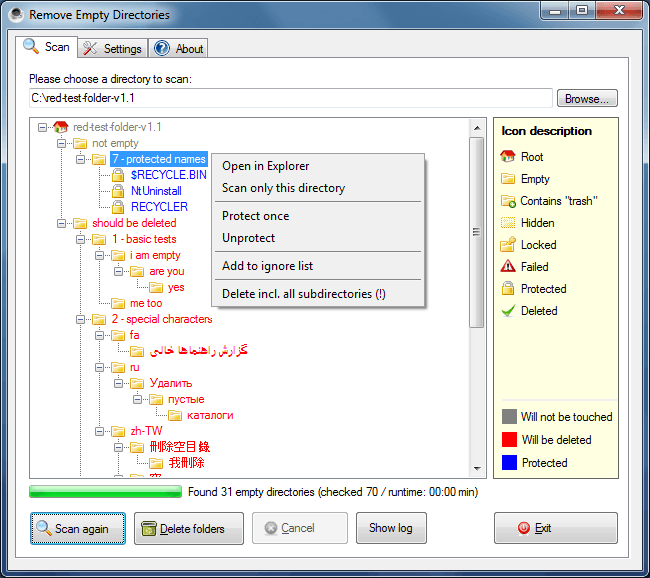
One might think that searching and deleting empty directories is a trivial thing, but once you have hundreds of them it get’s really exhausting. That’s the reason I made RED. It’s a small and simple tool that searches and deletes empty directories recursively below a given start folder. And before deleting anything it let’s you check all empty directories it found.

Features

  • Shows empty directories before deleting them
  • Supports multiple delete modes (including Delete to recycle bin) (Version 2.2)
  • Allows white and black listing of directories by using filter lists
  • Can detect directories with empty files as empty
Source:http://www.jonasjohn.de/red.htm

Free Studio 5


Requirements
Windows XP SP3, Vista, Windows 7 and .Net Framework 2 SP2
Description
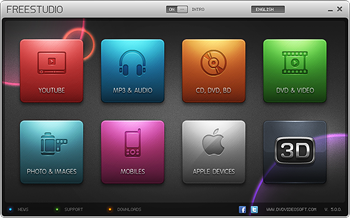
Free Studio is an all-in-one package bundling all free multimedia applications developed by DVDVideoSoft. Free Studio Manager has 8 sections for easy access to any application: YouTube programs; MP3 and Audio; CD, DVD and BD; DVD and Video; Photo and Images; Mobiles; Apple Devices; and 3D programs.
With this free software you can easily:
- convert video and audio files between different formats as well as iPod, PSP, iPhone, BlackBerry and all other popular mobile phones and devices;
- burn and rip DVDs and audio CDs;
- upload and download YouTube videos and music to your computer, iPod, PSP, iPhone or BlackBerry;
- perform basic editing of audio and video files;
- record videos and make snapshots;
- create 3D videos and images.
Free Studio does not contain spyware or adware. It's absolutely free and completely safe to install and run.


Focus booster


A free application to help you get what you need done. Pronto!
focus booster is a simple and elegant application designed
to help you eliminate the anxiety of time and enhance your focus and concentration.
focus booster has been designed based on the principles of
the pomodoro technique and features:
  • a sleek and unobtrusive design
  • color changes as time goes by for quick, peripheral updates
  • alarm/buzzer sounds for completed sessions
  • customizeable time and sound settings
  • session counter
It's quick to start up and works efficiently in the background
without consuming computer resources, or your focus.


11/30/11

EASEUS Partition Master

Main Features
partition manager icon
Partition Manager

9/5/11

The Best Free FTP Client for Windows

 What’s FTP? FTP is as quoted from Wikipedia is an Internet protocol that runs on application layer which is standard for transferring files (files) computer between the machines in an internet work. FTP is one of the earliest network protocol was developed, and is still used today to perform the download (downloads) and (uploads) files between your computer and FTP server FTP client.


How To Change Hardisk Partition Size in Windows 7

Different from the previous version, Windows 7 and Windows Vista is already available built-in applications that can be used for partitioning hard drives. Just as the tools created by third parties (Third party software) such as Partition Magic, Easeus Partition Manager or other applications, these tools can also be used to change the capacity of the hard disk drive in Microsoft’s operating system.
How To Change Hardisk Partition Size in Windows 7 Images


Free Online Photo Editor for You

These tips are a continuation of the discussion of photo editors in this blog, if sometimes we play in the cafe and want to edit photos but the cafe that we choose does not have image editing application, or better known as Photoshop. There is a quick way to change/edit photos with the help of Online Photo Editor.
Free Online Photo Editor for You Images


Notebook Drivers Link List For Acer, Asus, Compaq, Dell, HP, Lenovo, Toshiba

“Where I can get drivers notebook?” Consumer notebooks often faced the same problems that the manufacturers do not give the drivers on every product they sold . If anything, it is usually incomplete and that too at the initiative of the notebook seller in stores that have downloaded manually and give it to you.
Notebook Drivers Link List For Acer, Asus, Compaq, Dell, HP, Lenovo, Toshiba Images


Battery Saving Tips for Notebook or Netbook

If you often go to cafes, malls, airports or anywhere else, and always carry a notebook/netbook, you may often had an experience problems due to power your notebook’s battery does not last long when ignited. To fix this, try using the following tips to save the battery in your notebook or netbook you have.
Battery Saving Tips for Notebook or Netbook Images

CamStudio, Free Software for Capture Video Screen Shot

Have you ever wanted to do video capture of screen shots on a computer screen? Have you ever seen a video tutorial that there are screen shots of computer screen tutorials? If you ever find something like that, maybe you will want to make the same thing to be enjoyed by others.
CamStudio, Free Software for Capture Video Screen Shot Images
There are many software that can be used to capture video from a high quality till the medium quality, from free till paid, from the particular to the video capture screen shots is until a small part of the video editing software. They all have advantages and disadvantages of each.
One of the software which is specifically designed to capture a screen shot of the video is Cam Studio. This software is open source and can be obtained for free. Quality of the video from Cam Studio also quite good, not inferior to paid software.
Some things you should know about Cam Studio namely:
  • The result of video capture has AVI and SWF format that can be selected prior capture screen shot is executed.
  • The size of the video width can be adjusted according to the width of the media who wish to be recorded. You can select the Region (The size can be determined), Fixed Region (size in pixels), Full Screen (Full Screen).
  • Supports voice recorder into the video. There are two audio inputs that can be selected, whether recording from a microphone or audio system output from the computer/notebook.
CamStudio, Free Software for Capture Video Screen Shot Images
If you want the video quality is more perfect, you can download Lossless Codec that is provided by the developer Cam Studio in addition to video capture. The way is to download and install codec to your computer.
Used was fairly easy, just run the application then click the red button (record) to start recording video from screen shots. If you are finished press the stop button and enter the file name of the recording. If you want to use the full screen view, simply by click Region menu and select Fixed.
If you want download CamStudio for now, pleave visit link here http://camstudio.org/
source:http://www.notebooksoftware.net/camstudio-free-software-for-capture-video-screen-shot/

7 Sticky Notes, You’ll Never Forget Again for Your Schedules!

For those of you who work office, it may already be familiar with the name Post-It. This simple note is very useful because it can be affixed anywhere (documents, monitors, laptops, etc.), so you can always remember the important things you wrote on the note.
For those of you who like a Post-It and many everyday working at a computer/laptop, there is good news. There is now a digital version of Post-It, namely 7 Sticky Notes. With this application, you can put information or note important without fear of forgetting. Why? Because you put it in place you are see, Windows Desktop!
7 Sticky Notes, Youll Never Forget Again for Your Schedules! Images


Photoscape, The Best Free Editing Software for Everyone

When talking about photo editing, maybe most of the people would imagine Photoshop. Application made by Adobe is indeed become a very popular tool among photographers or designers because it offers a wide range of features. However, many software also have an impact feature: price is very expensive and a heavy application at run time because it takes a lot of resources (memory and processor). In addition, there are various features are often wasted, because there is not much use.


Free Software for Recovery Files

Perhaps you have experienced, your important data is lost from the computer. Because you were accidentally delete it, were deliberately removed by someone who is not responsible or perhaps because of your hard drive formatted by accident.
Free Software for Recovery Files Images
To restore the data, you can ask to people who are experts in the field of computer to restore files that were deleted. Or, if you want to do it yourself, you can use recovery software available on the internet and install it on your desktop PC or notebook.


Share Files and Folder Between Windows 7 and Windows XP

As we know, Windows 7 has better security features than previous generations of Windows. Hence also, the way the system handles files and folders is also slightly different. Moreover, if related to the network, many differences and changes in structure and level of user security on network folders.
Share Files and Folder Between Windows 7 and Windows XP Images
For those people who often share the file using Windows XP, may be they will had a little difficulty feeling when trying to share folders on a computer using the operating system Windows 7. Here we say how to do it. (While doing the experiment, we used Windows XP Professional and Windows 7 Ultimate Edition).
Setting sharing files in Windows 7 ultimate edition
  • Make sure the PC Windows 7 and XP have the same group. (Basically, it is not the absolute price, but it would be easier if you make the same group to connect the two computers).
  • Open the Control Panel, select Network and Internet and continue with your click Network Sharing Center.
  • Click on Change Advanced Sharing Settings, and change all the settings to allow other computers can access the computer it windows 7. If necessary, do not use password protection sharing options for people who access your computer no longer need to access using a password and authentication (For the safety of your data, do not ever use this option on a public network such as hotspots in cafes, mall or other public areas).
  • After that, click Save Changes.
  • Continue to create folders to be shared with other computers.
  • Open windows explorer and create a new folder. Right-click the folder and select Properties.
  • Click the Sharing tab followed by clicking the Share button.
  • On the drop down menu, add the users who are allowed to access the folder (In this example we use Everyone, which essentially everyone can access without going through password).
  • Add the permissions on the user Everyone, is only be read only or can also add files (write).
  • Finally, click share and followed by clicking the Done button.
Setting sharing files in windows XP professional
  • Open windows explorer and create a new folder that will be used for sharing files.
  • Right-click the folder and select Properties.
  • Click the Sharing tab and put a check on the Share this folder on the network.
  • If you allow someone else to write or delete files in the folder, mark it on the Allow network users to change my files.
  • Last time, click the OK button.
Proof of sharing folders setting
Try to access the windows folder 7 through Windows XP. The trick, open the Control Panel, Network Connections, My Network Places. Find and double-click the computer name of Windows 7. Click the folder sharing and you try to grab data from there. If you allow read-write access, you try to do the writing. Can be a way to make a new folder or try to copy a file from your XP computer to a folder.
Now back to the computer that had windows OS 7. Open Windows Explorer, click Network on the left bottom, then select the computer that installed windows 7. There you will see a folder that has been shared. Try to access and grab a few files on the folder. If you had to give read-write access to the Allow network users to change my files, then you can copy, add or delete files on the share folder.
It’s finished tips this time. You can connect a computer with windows 7 windows XP without having to ask a network administrator.

Easy Ways to Change Wallpaper Windows 7 Starter with Starter Background Changer

In the previous article, we’ve explained how to change wallpaper windows 7 starter using software Oceanis Change the Background, and at this time we will be sharing how to do it any other way but with different programs.
Easy Ways to Change Wallpaper Windows 7 Starter with Starter Background Changer Images
The program is called Starter background Changer made by a French nationality programmer named Renaud Gerson. Steps to change the wallpaper of Windows 7 Starter background Changer is:
There are several options that you can exploit to change the wallpaper windows with this software. First, you try to right click on the screen, continue to choose Personalize (This option does not already exist in Windows 7 Starter). Choose wallpaper that you want to use as the background, then click OK or Apply button.
Easy Ways to Change Wallpaper Windows 7 Starter with Starter Background Changer Images
You can also choose other options such as replacement of wallpaper automatically every time that we have set. Do not forget also to select the folder where you save the image files that you’ll use as the wallpaper.
As the second option, to determine which image you want to use as your wallpaper can be through windows explorer. You must open windows explorer, select the folder of your image, choose which images you’ll use it as wallpaper, right click the image and finally select To choose like wallpaper.
Easy Ways to Change Wallpaper Windows 7 Starter with Starter Background Changer Images
Some versions of Windows 7 starter is not compatible with this application. Use other software such as Oceanis Change Background to change your wallpaper windows 7 starter.
No need to upgrade windows 7 starter to a higher version if you just want to change the wallpaper on the screen. Only required a small program to do it all. Lets try and good luck for you!

How to Extend Laptop Battery Life (Lithium-ion)

In the previous article about “Consider Replacing your battery in NoteBooks“, I’ve shared about my experiences in dealing with the problem. Because of that incident, I was so diligent in seeking information about the battery in the hope of finding tips so that my battery is already showing signs of “aging” that can be durable and long lasting. Well, in this article I want to share about notebook battery tips to be durable and long lasting.
How to Extend Laptop Battery Life (Lithium ion) Images
First, please note that the battery can be in-charge (rechargeable battery) that there are several types. Frequently used for general electronic goods are usually Nickel based (NiCd) and Lithium-based (Lithium-ion). For laptops, at this time almost certainly all use a Lithium-ion type. Besides being able to save more power, Lithium-ion batteries are also more environmentally friendly than NiCd batteries are highly toxic.
Knowing the different types of batteries is very important because the two are very different characteristics. In the NiCd battery, electrolytes that are inside will gather at the bottom (in base) due to the influence of gravity, when stored too long (in storage). That’s why when purchasing a new NiCd battery, it is advisable to charge at least 8 hours (optimum 16-24 hours) before first use. But, when buying electronic equipment that use batteries store party (seller) suggested to charge the battery at least 8 hours before first use, although not a NiCd battery type.
Mistaken assumption that the battery should be used until really (want to) run out before it can be charged again. Again this applies to NiCd, where the batteries of this type there is the phenomenon of “memory effect”, as the battery is able to “remember” the amount of power that are filled during the last charging process. So for example, if the capacity of NiCd batteries still 65% and in-charge to full (which means the battery charge as much as 35%), the battery will be considered as though its capacity to 35%. But, it does not apply to Lithium-ion battery type.
Now, battery type Lithium-ion batteries widely used for other electronic devices such as mobile phones or digital cameras. So the tips below can apply your gadgets that use Lithium-ion battery type. The following tips:
  • For the first time, you must use of battery charge normally. As already described above, to charge the battery at least 8 hours for the first time only applies to types of Nickel-based batteries. For Lithium-ion battery, the lack of difference between charging the 1st, 5th, or the 500. In fact, if in-charge for too long can result in Overcharging makes the battery life getting shorter.
    How to Extend Laptop Battery Life (Lithium ion) Images
  • Charge the battery regularly in short intervals without having to wait until the battery is (almost) gone. Battery type Lithium-ion batteries are not familiar with the phenomenon of “memory effect” like NiCd batteries. In fact, research indicates that the batteries are used in-charge when its capacity is still 70% – 75% age 5-6 times longer than batteries that are often in charge when the capacity is almost exhausted.
  • Keep the temperature is not too hot. High temperature is the number one enemy of batteries because of the heat will accelerate the degradation of cells in the battery. For as much as possible put the laptop in a cool place and avoid direct sunlight. The habit of putting a laptop in the car on a hot day should also be avoided if you do not want the battery life is reduced drastically.
  • Set the air circulation to keep it smooth. Avoid putting a laptop in bed or pillows as this will interfere with air circulation that resulted in the laptop becomes hot quickly. The most practical way is to use cool pad. Coolpad are simple tools that cheap but very useful especially to keep the temperature so that the laptop does not overheat. Additionally, after using a laptop, you should set aside some time so that the laptop be cooler before it is inserted into a laptop bag.
    How to Extend Laptop Battery Life (Lithium ion) Images
  • Wherever possible use a laptop without battery, if at all possible. It is actually my own experience when evaluating my habit to use the laptop. After I thought about it, I was every day at the office using a laptop is like a PC, which is about 6-8 hours non-stop and rarely move. Well if you already like this, seems to be silly if I use a laptop with a back and forth to charge the battery within that time frame. After realizing this, now I almost always turn on my laptop without the battery (direct to power), both during the office or at home. I just use a battery if there are any tasks / purposes beyond that required I use my laptop as a mobile.
  • If you want to save the battery for a long time, keep a cool place with a capacity of 40%. There was a study comparing the battery stored in the capacity of 40% with a stored battery with a capacity of 100%. The result, stored battery with a capacity of 100% capacity loss experienced a greater than 40%. I use this knowledge to my digital camera is not very often I use (I usually use weekends only, and even then not every week). Last day, if I have done using a digital camera, I always charge to the brim with ideas that will be used later when it is ready for use. But no anymore. Now I charge a digital camera to the full when it is used.
    How to Extend Laptop Battery Life (Lithium ion) Images
  • Use energy-efficient laptop. By saving energy use laptop then battery life could last longer. There are several ways to save battery life, all of which have been discussed in the article Tips on Saving Battery Notebook/Laptop this.
Besides the above tips, you should be diligent to check the condition of your laptop battery. If you use the HP brand, then you can use existing applications in the Battery Check HP Support Assistant to see the technical data of your laptop battery. In addition, there is also a free application that can be used Battery Care for this purpose.


How to Extend Laptop Battery Life (Lithium ion) Images

The Best Web Camera (WebCam) Software for Windows

For those people who are accustomed to using a web camera, you must get used to using the included web camera software on the device you buy. But if you are still not satisfied with the default camera software when purchasing software, you can use several software below. You can use software for chatting with the people around the world.
The Best Web Camera (WebCam) Software for Windows Images
Some software that we mentioned in the form of trial, some are shareware and the rest is free software that you can use for free. Here, we will convey our best webcam application (based on experience and references from many websites).


Game Downloader

Description Game Downloader is a portable and open source download client, which interacts with a server si...